- Aloitussivu /
- Elektroniikka /
- Tietokonetarvikkeet /
- Tietokonekomponentit /
- Single Board Computers /
- I2C 1602 LCD Display Module 16X2 Blue Backlig...
0 ratings






Tuotteen numero:
182907905
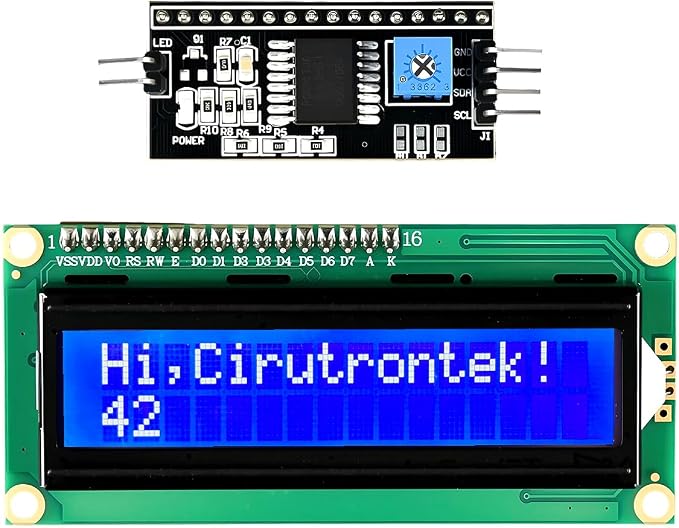
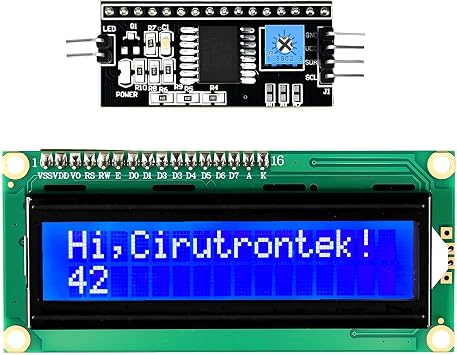
I2C 1602 LCD Display Module 16X2 Blue Backlight LCD Module for Raspberry Pi Arduino - 2-Pack
85% vastaajista suosittelisi tätä ystävälle
Tuotteen numero:
182907905
€ 17
Hintatiedot
Ei sisällä toimitus- ja tullimaksuja ( Toimitus- ja tullimaksut lasketaan kassalla )
*Kaikki tuotteet tuodaan maasta Yhdysvallat
0 ratings
Kirjoita arvostelu
Varastossa
 Tuotu myymälästä paikasta USA
Määrä:
Tilaa nyt ja saat sen noin Sunday, Syyskuu 27
Suojattu tapahtuma
Ubuy tekee kovasti töitä turvallisuutesi ja yksityisyytesi suojaamiseksi. Kehittynyt maksun turvallisuusjärjestelmämme varmistaa luottamuksellisuuden salaamalla tietosi siirron aikana AES (Advanced Encryption Standards)- ja SSL (Secure Socket Layer) -protokollilla. Maksutietosi ovat 100 % turvassa, sillä emme jaa maksutietojasi kolmansien osapuolten myyjille.
Tärkeimmät logistiikkakumppanimme


Simplify wiring and save space on circuit boards with our I2C display module.

Osta nyt, maksa myöhemmin

Fast
Shipping

Ilmainen
palautus*

Pakattu turvallisesti

100-prosenttisesti alkuperäistuotteita

PCI DSS Compliance

ISO 27001 Certified




Note: Step Down Voltage Transformer required for using electronics products of Yhdysvallat store (110-120). Recommended power converters Osta nyt.


Mikä erottuu joukosta
Dual Pack Value
The 2-pack offers great value, ensuring you can complete multiple projects or have a spare display for future needs, optimizing your investment in interactive projects.
Blue Backlight
The vibrant blue backlight enhances visibility in various lighting environments, allowing clear readability, which is essential for both indoor and outdoor projects.
Versatile Compatibility
Designed for Raspberry Pi and Arduino, this display module seamlessly integrates with popular platforms, making it easy for hobbyists and professionals to implement into diverse projects.
Tuotteen yksityiskohdat
| Connectivity Technology | I2C |
| Operating System | Linux |
| Compatible Devices | Raspberry Pi, Arduino, ESP32 |
| Processor Count | 1 |
| Item Dimensions L x W x H | 2.95"L x 1.38"W x 0.79"H (7.5 x 3.5 x 2 cm) |
| Brand | Cirutrontek |
| Model Name | I2C LCD Display - 2 Pack |
| Built-In Media | I2C LCD 1602 Display 2pcs |
| Number of Packs | 2 |
| Number of Items | 2 |
| Unit Count | 2 Count |
| Item Weight | 2.47 ounces (70.02 grams) |
| Manufacturer | Cirutrontek |
| Model Number | I2C LCD Display - 2 Pack |
| Mfr Part Number | I2C LCD - 2 PCS |
| Included Components | I2C LCD 1602 Display 2pcs |
Pakkauksen sisältö
I2C LCD 1602 Display 2pcs
Kenelle sopii?

-
Students Learning
Ideal for students engaging in introductory electronics and programming with Arduino or Raspberry Pi projects.
-
DIY Hobbyists
Perfect for hobbyists looking to create custom displays for projects using simple interfaces and clear visuals.
-
Prototyping
Useful for developers needing quick and efficient display solutions during the prototyping phase of product development.

-
Professional Projects
Not suited for high-end applications requiring advanced features or higher-resolution displays than 16x2.
TUOTEKUVAUS.
Onko sinulla kysyttävää? Keskustele kanssamme
Asiakkaiden kysymykset ja vastaukset
-
kysymys:
What is an I2C 1602 LCD Display Module?
vastaus: The I2C 1602 LCD Display Module is a versatile electronic display component that supports a 16x2 character format, allowing it to display 16 characters per line with two lines. Equipped with a blue backlight for improved visibility, this module is designed for easy integration with Raspberry Pi and Arduino projects. It operates via the I2C interface, which simplifies wiring by reducing the number of connections needed. It's ideal for projects requiring text output, such as real-time data displays or user interfaces in DIY electronics. -
kysymys:
How do I connect the I2C 1602 LCD Display Module to my Raspberry Pi?
vastaus: Connecting the I2C 1602 LCD Display Module to a Raspberry Pi is a straightforward process. First, you need to connect the SDA and SCL pins of the display to the corresponding SDA (GPIO 2) and SCL (GPIO 3) pins on your Raspberry Pi. Additionally, connect the VCC pin to a 5V power source and the GND pin to the ground. Once connected, using a programming language like Python, you can utilize libraries such as 'smbus' to control the display effectively. This setup allows for easy integration in projects that require visual data representation. -
kysymys:
Can I use the I2C 1602 LCD Display Module with Arduino boards?
vastaus: Yes, the I2C 1602 LCD Display Module is fully compatible with various Arduino boards. To connect, wire the SDA pin to the A4 pin and the SCL pin to the A5 pin on an Arduino Uno, while also connecting the VCC and GND pins to their respective power sources. After connecting, you can use libraries such as 'LiquidCrystal_I2C' to program and control the display. This versatility makes it perfect for projects like prototypes, home automation systems, and interactive displays that require character output. -
kysymys:
What projects can I create using the I2C 1602 LCD Display Module?
vastaus: With the I2C 1602 LCD Display Module, you can create an array of exciting projects. For example, you could develop a temperature monitor that displays real-time temperature data, or a digital clock that shows the current time. It can also be used in projects like an interactive menu system for controlling home appliances or a simple score counter for games. The display offers an enhanced way to communicate information visually, making it a valuable tool for hobbyists and educators alike. -
kysymys:
Is there any special software required to run the I2C 1602 LCD Display Module?
vastaus: While there is no proprietary software needed, you will require specific libraries to communicate with the I2C 1602 LCD Display Module effectively. For Raspberry Pi, libraries such as 'RPi.GPIO' and 'smbus' are commonly used to interface with the module. For Arduino, the 'LiquidCrystal_I2C' library simplifies the interaction with the display, allowing you to easily send text and commands. These libraries provide functions to initialize the display, send data, and adjust settings, enhancing your programming experience. -
kysymys:
What are the benefits of using an I2C interface with the LCD display?
vastaus: Utilizing the I2C interface provides several advantages when working with the LCD display. It reduces the number of GPIO pins required, allowing more space for additional components in your project. The I2C communication protocol also enables multiple devices to be connected on the same two wires, simplifying your circuit design. This efficiency is particularly beneficial in complex projects where minimizing space and simplifying wiring is crucial, such as in wearable technology or compact electronics. -
kysymys:
Can the blue backlight of the LCD display be adjusted?
vastaus: Most standard I2C 1602 LCD modules come with a fixed LED backlight, providing a constant blue illumination to enhance readability in various lighting conditions. Unfortunately, the brightness of the backlight is not adjustable unless you're using a specific model designed with variable brightness settings. However, that fixed backlight is effective for most applications, ensuring that the display remains visible even in low light settings, making it suitable for different project environments. -
kysymys:
What voltage does the I2C 1602 LCD Display Module require?
vastaus: The I2C 1602 LCD Display Module typically operates at 5V, making it compatible with most common microcontrollers like Arduino and Raspberry Pi. When connecting, ensure to provide a stable 5V power supply to the VCC pin, while connecting the GND pin to the ground of your microcontroller. This voltage compatibility allows for seamless integration in various electronic projects and ensures reliable performance of the display in showing character data. -
kysymys:
How do I troubleshoot if my I2C 1602 LCD Display Module isn't working?
vastaus: If your I2C 1602 LCD Display Module is not displaying data correctly, start by checking your wiring connections to ensure they are secure and correctly mapped. Verify that the I2C address in your code matches the module's address, which can be confirmed using an I2C scanner. Additionally, ensure that your libraries are correctly installed and up-to-date. Testing with basic example codes can also help isolate the issue, whether it’s hardware-related or a programming error. -
kysymys:
Where can I buy I2C 1602 LCD Display Module 16X2 Blue Backlight LCD Module for Raspberry Pi Arduino - 2-Pack?
vastaus: You can purchase the I2C 1602 LCD Display Module 16X2 Blue Backlight LCD Module for Raspberry Pi Arduino - 2-Pack from Ubuy. Ubuy offers a convenient online shopping experience, allowing you to explore product details, options, and availability specific to Finland. By shopping at Ubuy, you can ensure a seamless purchasing process, along with various payment options and customer support for any queries you may have.
Cirutrontek Single Board Computers I2C LCD Display - 2 Pack Editorial Review


Toimituksellisia arvosteluja ei löytynyt
Asiakkaiden arvostelut ja arvosanat
5 asiakkaiden arvosanat
-
5 tähteä
41%
-
4 tähteä
30%
-
3 tähteä
29%
-
2 tähteä
0%
-
1 tähteä
0%
Arvostele tämä tuote
Jaa ajatuksesi muille asiakkaille
Plussat
- Easy to interface with
- Bright blue backlight
- Clear display visibility
- Compatible with Raspberry Pi
- Great for DIY projects
Miinukset
- No included instructions for beginners.
LUOTTAMUS JA OSTAJAN TURVA

JK
Jasmin
Vahvistettu ostaja
“Great products and very good service: very easy and very fast international delivery.”
9 September 2026 · via Trustpilot
AG
Anke
Vahvistettu ostaja
“Wonderful online shopping experience, smooth transaction from the start. Payment method works conveniently and delivery is unexpectedly fast and reliable. You go the extra mile for service. What makes this even more amazing, you deliver to Namibia. I will remain a happy Ubuy customer and will increase my purchases for sure! Thank you!”
10 September 2026 · via Trustpilot
H
Hazel
Vahvistettu ostaja
“Very easy to find the products what you need, and so fast delivery, that’s why I highly recommended to others costumers to used ubuy.”
10 September 2026 · via Trustpilot
O
Opaleye
Vahvistettu ostaja
“I received exactly what I ordered I was skeptical about your site because that was my first time to order. But the order came timely and neatly packaged. I was not disappointed. Thank you.”
11 September 2026 · via Trustpilot
AC
Adele
Vahvistettu ostaja
“Easy to find and order what you want on the website. Delivery is quick to the UK”
8 September 2026 · via Trustpilot
Turvallinen kassatapahtuma
Maailmanlaajuinen toimitus
Helpot palautukset
Aidot tuottee
Tuotteen hintahistoria
Tärkeitä tietoja
- Rajoitukset: Kansainvälisesti toimitettujen tuotteiden kohdalla tulee ottaa huomioon, ettei valmistajan takuu välttämättä ole voimassa, etteivät valmistajan huoltovaihtoehdot välttämättä ole käytettävissä, etteivät tuotteen ohjekirjat, oppaat ja turvallisuusvaroitukset välttämättä ole kohdemaan kielellä, ettei tuotteita (ja niiden oheismateriaalia) ole välttämättä suunniteltu vastaamaan kohdemaan standardeja, teknisiä tietoja ja merkintävaatimuksia ja etteivät tuotteet välttämättä vastaa kohdemaan jännitettä ja muita sähköstandardeja (jolloin ne saattavat tarvittaessa vaatia sovittimen tai muuntimen käyttöä). Vastaanottaja on vastuussa sen varmistamisesta, että tuote voidaan toimittaa kohdemaahan laillisesti. Kun vastaanottaja tekee tilauksen Ubuysta tai sen kumppanuusyhtiöiltä, hän on myös rekisteröity maahantuoja ja hänen tulee noudattaa kaikkia kohdemaan lakeja ja säädöksiä.
- Kaikki Ubuyssa listatut tuotteet eivät ole myytävänä, koska Ubuy on maailmanlaajuinen hakukone. Tuotteisiin kohdistuu vienti- ja myyntisäännöksiä.
€ 17
Tilaa nyt ja saat sen noin Sunday, Syyskuu 27
This item is not restrict in my country.(Please click on above link if this item is not restrict in your country, So our team will review and allow.)
Määrä:
Suojattu tapahtuma
PCI DSS -yhteensopiva ja ISO 27001:2022 -sertifioitu, salatut maksut ja täysi ostajansuoja jokaisella tilauksella.
Tärkeimmät logistiikkakumppanimme
Nopein rajat ylittävä toimitus
Ominaisuudet ja hyödyt
- Built-in I2C adapter for easy connection.
- Reduces pin count compared to parallel LCDs.
- Displays 2 rows of 16 characters each.
- Ideal for showing sensor data and status messages.
- Operates on a 5V power supply, compatible with Arduino, Raspberry Pi, and ESP32.
- Wiring requires only 4 connections.
Ubuy-takuu
Nauti huolettomasta ostoskokemuksesta: 100 % alkuperäisiä tuotteita, PCI DSS -yhteensopiva maksuturvallisuus, ISO 27001 -sertifioitu tietosuoja, nopein rajat ylittävä toimitus, ilmaiset palautukset ja turvallinen pakkaus jokaisella tilauksella.