- Aloitussivu /
- Sähkötarvikkeet /
- Computer Accessories /
- Networking Products /
- Switches /
- Barco ClickShare Button Switch, Gray (R986150...
0 ratings


Tuotteen numero:
4650856
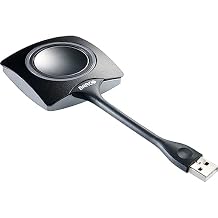
Barco ClickShare Button Switch, Gray (R9861500D01) for Laptop
Tuotteen numero:
4650856
€ 115
Price Details
Excluding Shipping & Custom charges ( Shipping and custom charges will be calculated on checkout )
*All items will import from Yhdysvallat
0 ratings
Kirjoita arvostelu
Varastossa
 Tuotu myymälästä paikasta USA
Tee tilaus nyt, niin saat tuotteen noin Tiistai, Elokuu 04
Suojattu tapahtuma
Ubuy tekee kovasti töitä turvallisuutesi ja yksityisyytesi suojaamiseksi. Kehittynyt maksun turvallisuusjärjestelmämme varmistaa luottamuksellisuuden salaamalla tietosi siirron aikana AES (Advanced Encryption Standards)- ja SSL (Secure Socket Layer) -protokollilla. Maksutietosi ovat 100 % turvassa, sillä emme jaa maksutietojasi kolmansien osapuolten myyjille.
Tärkeimmät logistiikkakumppanimme


Osta nyt, maksa myöhemmin

Fast
Shipping

Ilmainen
palautus*

Pakattu turvallisesti

100-prosenttisesti alkuperäistuotteita

PCI DSS Compliance

ISO 27001 Certified


Note: Step Down Voltage Transformer required for using electronics products of Yhdysvallat store (110-120). Recommended power converters Osta nyt.


Mikä erottuu joukosta
Instant Connectivity
Experience seamless wireless connection to your laptop, enabling instant screen sharing without the hassle of cables or complex setups, making meetings more efficient and productive.
Kompakti muotoilu
The sleek and portable design of the ClickShare Button ensures easy transportation and integration into any workspace, allowing users to present effortlessly from various devices.
Cross-Platform Compatibility
Designed to work with a wide range of operating systems, this device supports both Windows and macOS, ensuring an inclusive solution for diverse user environments and maximizing usability.
Tuotteen yksityiskohdat
| Toimintatila | OFF-NONE-ON |
| Nykyinen arvio | 2 Microamps |
| Operating Voltage | 120 Volts |
| Contact Type | Normally Open |
| Liittimen tyyppi | Usb Type a |
| Kytkin Tyyppi | Kill Switch |
| Terminal | Solder |
| Circuit Type | 2-way |
| Asennustyyppi | Plug-In Mount |
| Actuator Type | Button |
| Number of Positions | 4 |
| Lower Temperature Rating | 101 Degrees Fahrenheit |
| Upper Temperature Rating | 100 Degrees Fahrenheit |
| Ohjausmenetelmä | KOSKETA |
| Connectivity Protocol | Wi-Fi |
| Watti | 230 watts |
| Ohjaustyyppi | käsikirja |
| Yhteensopivat laitteet | Laptop |
| Väri | Gray |
| Tuotteen mitat | 6.58 x 3 x 1.38 inches (16.7 x 7.6 x 3.5 cm) |
| Yksikkömäärä | 1.0 Luku |
| Tuotteiden määrä | 1 |
| Materiaalityyppi | Unspecified |
| Contact Material | Brass |
| International Protection Rating | IP54 |
| Brändin nimi | Barco |
| Malli | R9861500D01 |
| Globaalin kaupan tunnistenumero | 05400503000005 |
| Valmistaja | Barco |
| UPC | 053926320431 783555029664 750408401885 796594593300 783555095348 642892822317 |
| Osanumero | R9861500D01 |
| Tuotetyypin nimi | Barco Clickshare Button - Button Switch (R9861500D01) |
| Sisältää osat | Button switch |
| Tuotteen paino | 0.28 Pounds (130 grams) |
| Brändi | Barco |
| Materiaali | Unspecified |
| Tuotteen mitat L x W x H | 6.58 x 3 x 1.38 inches (16.7 x 7.6 x 3.5 cm) |
Kenelle sopii?

-
Frequent Presenters
Ideal for professionals who frequently present and need quick and easy screen sharing in meetings.
-
Remote Workers
Perfect for remote employees who participate in virtual meetings, simplifying their connection to various display devices.
-
Tech-Savvy Teams
Beneficial for teams that value seamless technology integration for collaborative presentations and brainstorming sessions.

-
Rennot käyttäjät
Not suitable for occasional users who do not need regular access to wireless presentation tools.
TUOTEKUVAUS.
Barco ClickShare Button Switch, Gray (R9861500D01) for Laptop
Onko sinulla kysyttävää? Chattaa kanssamme
Asiakkaiden kysymykset ja vastaukset
-
kysymys:
What is the Barco ClickShare Button?
vastaus: The Barco ClickShare Button is a USB wireless presentation system that allows users to share their screens seamlessly during meetings and presentations. By connecting the Button to your device and pressing it, you can instantly share content to a connected display. This ease of use reduces the time spent on technical setups and improves collaboration, making it ideal for business environments, conference rooms, and educational settings. -
kysymys:
How does the ClickShare Button connect to my device?
vastaus: The ClickShare Button connects to your device via USB and is compatible with Windows and Mac operating systems. Once you plug the Button into your USB port, you will initiate the ClickShare app, which facilitates the wireless connection to the ClickShare Base Unit. This straightforward process ensures that anyone can present without needing technical expertise, making it particularly effective in team collaborations and presentations. -
kysymys:
Can I use the ClickShare Button with multiple devices?
vastaus: Yes, the ClickShare Button can be used with multiple devices. You simply need to change the USB connection to the device you wish to present from. Each time you switch devices, you’ll need to ensure that the ClickShare application is running on the new device. This versatility allows different team members to present their content effortlessly in a collaborative workspace without needing a permanent setup for each device. -
kysymys:
What types of content can I share using the ClickShare Button?
vastaus: You can share a wide range of content types using the ClickShare Button, including slideshows, videos, images, and real-time applications. Since it wirelessly transmits your screen content to the display, you can engage your audience with both static and dynamic media. This capability is particularly useful during business presentations, educational lectures, or any scenario where visual content enhances communication. -
kysymys:
Do I need to install software to use the ClickShare Button?
vastaus: Yes, the ClickShare Button requires the ClickShare application to be installed on your device. The software facilitates the wireless presentation process and ensures compatibility with various operating systems. By setting up the app before your presentation, users can experience a smooth and professional sharing experience without technical interruptions, making it especially convenient for last-minute setups. -
kysymys:
Is the ClickShare Button portable?
vastaus: Absolutely! The ClickShare Button is designed to be compact and lightweight, making it highly portable. You can easily carry it in your pocket or laptop bag, ensuring that you’re always prepared for impromptu meetings. This portability is ideal for professionals who move between different workspaces or frequently attend conferences, as it allows for seamless sharing anytime, anywhere. -
kysymys:
Can I share content from a mobile device with the ClickShare Button?
vastaus: The ClickShare Button primarily connects through USB on laptops or desktop computers. However, you can share content from mobile devices by using the ClickShare mobile app, which is available for both iOS and Android. This flexibility enables users to present content from their smartphones or tablets, enhancing engagement during meetings or presentations in any business or educational setting. -
kysymys:
How do I troubleshoot connection issues with the ClickShare Button?
vastaus: If you encounter connection issues with the ClickShare Button, first ensure that the app is running on your device and that the Button is securely plugged in. Restarting the application or re-establishing the connection can often resolve issues. Checking your Wi-Fi connection can also be critical, as the ClickShare system relies on a stable network. Troubleshooting these elements will typically restore your presentation capabilities promptly. -
kysymys:
What makes the ClickShare Button suitable for corporate environments?
vastaus: The ClickShare Button enhances collaboration and productivity in corporate environments by simplifying the screen-sharing process. Its user-friendly design allows team members to present effortlessly without extensive setup or technical knowledge. This feature is particularly beneficial in fast-paced business meetings where time is of the essence, as it encourages participation and streamlines communication among colleagues. -
kysymys:
Where can I buy the Barco ClickShare Button | USB Wireless Presentation System Button R9861500D01 in Finland?
vastaus: You can purchase the Barco ClickShare Button | USB Wireless Presentation System Button R9861500D01 from Ubuy in Finland. Ubuy offers a reliable platform for acquiring a variety of tech products and ensures that you receive genuine products with efficient service, making it a convenient choice for your presentation needs.
Barco Switches Editorial Review
The Barco ClickShare Button Switch seems to have received mixed reviews from customers. Some users have found the product to be great and perfect for training or meetings, and very easy to share screen content. They appreciate the convenience it offers and Consider it a valuable tool for their work. On the other hand, there are users who have expressed dissatisfaction with the product. A customer criticized its price, stating that there are free options available for screen sharing and expressing that the product is way too expensive. They also complained about its functionality, mentioning issues with connectivity, particularly on MacOS, and stated that it is not a reliable solution. Another customer recommended avoiding the ClickShare and using a long HDMI cable instead, due to the inconvenience and headaches they experienced with the product.
Asiakkaiden arvostelut ja arvosanat
1 asiakkaiden arvosanat
-
5 tähteä
100%
-
4 tähteä
0%
-
3 tähteä
0%
-
2 tähteä
0%
-
1 tähteä
0%
Arvostele tämä tuote
Jaa ajatuksesi muille asiakkaille
Plussat
- Easy to share screen content
- Convenient for work-related presentations
Miinukset
- Kallis
Platform Trust & Buyer Confidence

MT
Mohd
Verified buyer
“The product received very good packaging & safe…Thank You”
16 June 2026 · via Trustpilot
SJ
Shawati
Verified buyer
“Accurate delivery timing given”
16 June 2026 · via Trustpilot
YB
Youcef
Verified buyer
“Not madly expensive like I thought, and much quicker than promised.”
15 June 2026 · via Trustpilot
LM
Leila
Verified buyer
“Never dealt with Ubuy before, but everything worked out great. Seamless cross border purchasing and shipping. Thanks!”
6/7/2026 · via Trustpilot
KA
Kwame
Verified buyer
“The process was smooth, with clear communication and timelines. This was my 1st purchase and I am really impressed. I will definitely be coming back.”
12 June 2026 · via Trustpilot
Turvallinen kassatapahtuma
Global Delivery
Helpot palautukset
Genuine Products
Tuotteen hintahistoria
Tärkeitä tietoja
- Rajoitukset: Kansainvälisesti toimitettujen tuotteiden kohdalla tulee ottaa huomioon, ettei valmistajan takuu välttämättä ole voimassa, etteivät valmistajan huoltovaihtoehdot välttämättä ole käytettävissä, etteivät tuotteen ohjekirjat, oppaat ja turvallisuusvaroitukset välttämättä ole kohdemaan kielellä, ettei tuotteita (ja niiden oheismateriaalia) ole välttämättä suunniteltu vastaamaan kohdemaan standardeja, teknisiä tietoja ja merkintävaatimuksia ja etteivät tuotteet välttämättä vastaa kohdemaan jännitettä ja muita sähköstandardeja (jolloin ne saattavat tarvittaessa vaatia sovittimen tai muuntimen käyttöä). Vastaanottaja on vastuussa sen varmistamisesta, että tuote voidaan toimittaa kohdemaahan laillisesti. Kun vastaanottaja tekee tilauksen Ubuysta tai sen kumppanuusyhtiöiltä, hän on myös rekisteröity maahantuoja ja hänen tulee noudattaa kaikkia kohdemaan lakeja ja säädöksiä.
- Kaikki Ubuyssa listatut tuotteet eivät ole myytävänä, koska Ubuy on maailmanlaajuinen hakukone. Tuotteisiin kohdistuu vienti- ja myyntisäännöksiä.
€ 115
Tee tilaus nyt, niin saat tuotteen noin Tiistai, Elokuu 04
This item is not restrict in my country.(Please click on above link if this item is not restrict in your country, So our team will review and allow.)
QTY:
Suojattu tapahtuma
PCI DSS compliant and ISO 27001:2022 certified, with encrypted payments and full buyer protection on every order.
Tärkeimmät logistiikkakumppanimme
Nopein toimitus toiseen maahan
Ubuy Assurance
Experience worry-free shopping with 100% original products, PCI DSS-compliant payment security, ISO 27001-certified data protection, the fastest cross-border delivery, free returns *, and secure packaging on every order.