- Aloitussivu /
- Toimistotuotteet /
- Toimisto- ja koulutarvikkeet /
- Writing & Correction Supplies /
- Technical Drawing Supplies /
- Templates /
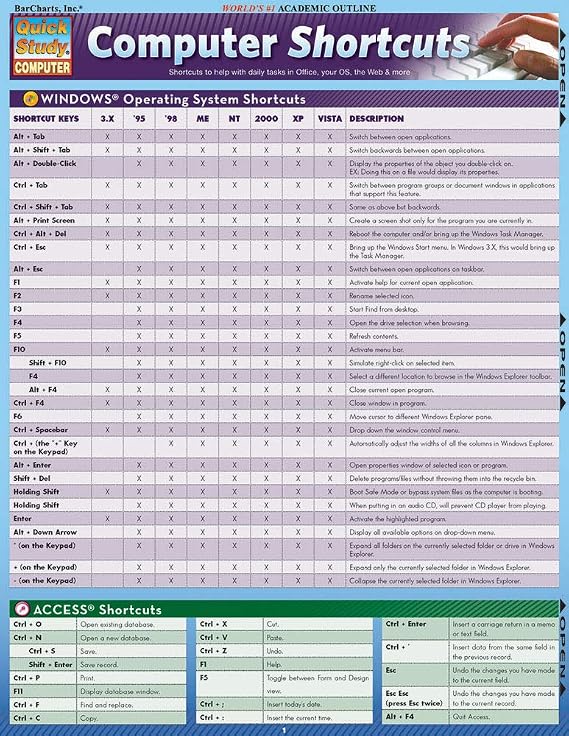
- Computer Shortcuts: QuickStudy Laminated Refe...
0 ratings


Tuotteen numero:
57413616
Computer Shortcuts: QuickStudy Laminated Reference Guide (Quick Study Computer)
89% vastaajista suosittelisi tätä ystävälle
Tuotteen numero:
57413616
€ 16
Hintatiedot
Ei sisällä toimitus- ja tullimaksuja ( Toimitus- ja tullimaksut lasketaan kassalla )
*Kaikki tuotteet tuodaan maasta Yhdysvallat
0 ratings
Kirjoita arvostelu
Varastossa
 Tuotu myymälästä paikasta USA
Tilaa nyt ja saat sen noin Torstai, Lokakuu 15
Suojattu tapahtuma
Ubuy tekee kovasti töitä turvallisuutesi ja yksityisyytesi suojaamiseksi. Kehittynyt maksun turvallisuusjärjestelmämme varmistaa luottamuksellisuuden salaamalla tietosi siirron aikana AES (Advanced Encryption Standards)- ja SSL (Secure Socket Layer) -protokollilla. Maksutietosi ovat 100 % turvassa, sillä emme jaa maksutietojasi kolmansien osapuolten myyjille.
Tärkeimmät logistiikkakumppanimme


Osta nyt, maksa myöhemmin

Fast
Shipping

Ilmainen
palautus*

Pakattu turvallisesti

100-prosenttisesti alkuperäistuotteita

PCI DSS Compliance

ISO 27001 Certified




Note: Step Down Voltage Transformer required for using electronics products of Yhdysvallat store (110-120). Recommended power converters Osta nyt.


Tuotteen yksityiskohdat
TUOTEKUVAUS.
Computer Shortcuts: QuickStudy Laminated Reference Guide (Quick Study Computer)
Onko sinulla kysyttävää? Keskustele kanssamme
Asiakkaiden kysymykset ja vastaukset
-
kysymys: Kuinka tehdä ostoksia Computer Shortcuts: QuickStudy Laminated Reference verkossa Ubuysta?
vastaus: On helppoa ostaa Computer Shortcuts: QuickStudy Laminated Reference verkossa Ubuysta.. Sinun tarvitsee vain etsiä tuote, valita toimitustapasi kassalla ja saada se toimitettuna sijaintiisi. -
kysymys: Onko Computer Shortcuts: QuickStudy Laminated Reference saatavilla verkossa ostoksille kohteessa Finland?
vastaus: Kyllä, Ubuyssa Finland tämä tuote on saatavillasi ostoksille kohtuulliseen hintaan.. Computer Shortcuts: QuickStudy Laminated Reference ei ole saatavilla paikallisesti, mutta voit luottaa meihin pikalähetyspalvelumme. -
kysymys: Kuinka kauan tuotteen saaminen kestää tilauksen tekemisen jälkeen?
vastaus: Tilaamasi tuotteen toimitusaika vaihtelee tilaamasi tuotteen ja valitsemasi toimitustavan mukaan.. Arvioitu toimitusaika mainitaan kassalla, joten ole huoleton ostaessasi.
QuickStudy Templates Editorial Review
Toimituksellisia arvosteluja ei löytynyt
Asiakkaiden arvostelut ja arvosanat
1 asiakkaiden arvosanat
-
5 tähteä
100%
-
4 tähteä
0%
-
3 tähteä
0%
-
2 tähteä
0%
-
1 tähteä
0%
Arvostele tämä tuote
Jaa ajatuksesi muille asiakkaille
LUOTTAMUS JA OSTAJAN TURVA

JK
Jasmin
Vahvistettu ostaja
“Great products and very good service: very easy and very fast international delivery.”
9 September 2026 · via Trustpilot
AG
Anke
Vahvistettu ostaja
“Wonderful online shopping experience, smooth transaction from the start. Payment method works conveniently and delivery is unexpectedly fast and reliable. You go the extra mile for service. What makes this even more amazing, you deliver to Namibia. I will remain a happy Ubuy customer and will increase my purchases for sure! Thank you!”
10 September 2026 · via Trustpilot
H
Hazel
Vahvistettu ostaja
“Very easy to find the products what you need, and so fast delivery, that’s why I highly recommended to others costumers to used ubuy.”
10 September 2026 · via Trustpilot
O
Opaleye
Vahvistettu ostaja
“I received exactly what I ordered I was skeptical about your site because that was my first time to order. But the order came timely and neatly packaged. I was not disappointed. Thank you.”
11 September 2026 · via Trustpilot
AC
Adele
Vahvistettu ostaja
“Easy to find and order what you want on the website. Delivery is quick to the UK”
8 September 2026 · via Trustpilot
Turvallinen kassatapahtuma
Maailmanlaajuinen toimitus
Helpot palautukset
Aidot tuottee
Tuotteen hintahistoria
Tärkeitä tietoja
- Rajoitukset: Kansainvälisesti toimitettujen tuotteiden kohdalla tulee ottaa huomioon, ettei valmistajan takuu välttämättä ole voimassa, etteivät valmistajan huoltovaihtoehdot välttämättä ole käytettävissä, etteivät tuotteen ohjekirjat, oppaat ja turvallisuusvaroitukset välttämättä ole kohdemaan kielellä, ettei tuotteita (ja niiden oheismateriaalia) ole välttämättä suunniteltu vastaamaan kohdemaan standardeja, teknisiä tietoja ja merkintävaatimuksia ja etteivät tuotteet välttämättä vastaa kohdemaan jännitettä ja muita sähköstandardeja (jolloin ne saattavat tarvittaessa vaatia sovittimen tai muuntimen käyttöä). Vastaanottaja on vastuussa sen varmistamisesta, että tuote voidaan toimittaa kohdemaahan laillisesti. Kun vastaanottaja tekee tilauksen Ubuysta tai sen kumppanuusyhtiöiltä, hän on myös rekisteröity maahantuoja ja hänen tulee noudattaa kaikkia kohdemaan lakeja ja säädöksiä.
- Kaikki Ubuyssa listatut tuotteet eivät ole myytävänä, koska Ubuy on maailmanlaajuinen hakukone. Tuotteisiin kohdistuu vienti- ja myyntisäännöksiä.
€ 16
Tilaa nyt ja saat sen noin Torstai, Lokakuu 15
This item is not restrict in my country.(Please click on above link if this item is not restrict in your country, So our team will review and allow.)
Määrä:
Suojattu tapahtuma
PCI DSS -yhteensopiva ja ISO 27001:2022 -sertifioitu, salatut maksut ja täysi ostajansuoja jokaisella tilauksella.
Tärkeimmät logistiikkakumppanimme
Nopein rajat ylittävä toimitus
Ubuy-takuu
Nauti huolettomasta ostoskokemuksesta: 100 % alkuperäisiä tuotteita, PCI DSS -yhteensopiva maksuturvallisuus, ISO 27001 -sertifioitu tietosuoja, nopein rajat ylittävä toimitus, ilmaiset palautukset ja turvallinen pakkaus jokaisella tilauksella.