- Home Page /
- Electronics /
- Computer Accessories /
- Tablet Accessories /
- Computer Keyboards /
- TOUR BOX Elite Plus All-in-Creative Console, ...
0 ratings






Item #:
207805820
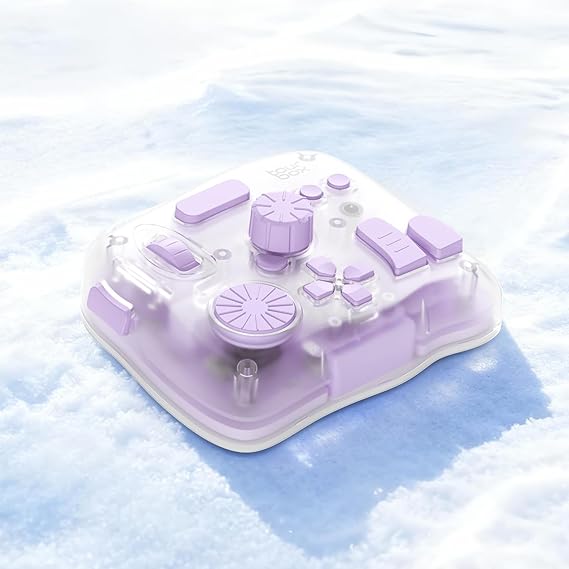
TOUR BOX Elite Plus All-in-Creative Console, Bluetooth Programmable Controller Keyboard for Photo & Video Editing, Color Grading, Illustration, Works
Item #:
207805820
€ 338
Price Details
Excluding Shipping & Custom charges ( Shipping and custom charges will be calculated on checkout )
*All items will import from US
In stock
 Imported from USA store
QTY:
Order now and get it around Friday, June 26
Secured transaction
Ubuy works hard to protect your security and privacy. Our advanced payment security system ensures confidentiality by encrypting your information during transmission using AES (Advanced Encryption Standards) and SSL (Secure Socket Layer) protocols. Your payment details are 100% secure as we do not share your payment details with third party sellers.
Our Top Logistics Partners


Elite Plus is the first controller designed for iPad creativity, redefining your creative workflow with intuitive controls and deep software integration.

Buy Now Pay Later

Fast
Shipping

Free
Return*

Secure Packaging

100% Original Products

PCI DSS Compliance

ISO 27001 Certified


Note: Step Down Voltage Transformer required for using electronics products of US store (110-120). Recommended power converters Buy Now.


What Stands Out
Bluetooth Connectivity
Seamlessly connect via Bluetooth, offering cable-free creativity. Perfect for studio setups or on-the-go projects, enhancing comfort and flexibility in your editing process.
Programmable Keys
Enjoy customizable shortcuts tailored for photo and video editing software. Streamline your workflow and save time, enabling you to focus more on creativity and less on navigation.
Wide Software Compatibility
Designed to work with leading software like Procreate, Adobe, and Davinci. This versatility makes it an essential tool for professionals across various multimedia fields, maximizing value.
Product Details
- SMART. CONTROL. ALL-IN-ONE. — Why relearn shortcuts for every software? TourBox Elite Plus redefines what a true creator’s tool should be—delivering a unified control logic across iPadOS, Android, macOS, Windows, and major creative apps. One setup. Faster learning. Higher efficiency.
- TOP-TIER DESIGN. TUNED TO EVERY DETAIL. — Four Arctic Series colors, a streamlined ergonomic form, a durable translucent shell that resists yellowing, refined haptic feedback, and more stable Bluetooth connectivity
- ONE LOGIC. EVERY APP. — Single-purpose controllers fall short. Elite Plus combines precision, versatility, and comfort into one device for illustration, photo editing, video editing, color grading and other creative workflows
- BUILT TO EVOLVE WITH YOU — Trusted by over 500,000 illustrators, editors, photographers, and more creators worldwide. TourBox is fully self-developed, with frequent software updates driven by real creative needs, so your tools evolve with your ideas
- ON-SCREEN GUIDANCE. ALWAYS IN SYNC. — Can’t remember every function? The interactive D-Pad or General HUD stays visible on screen, showing live key mappings, so you stay focused without interrupting your inspiration
| Compatible Devices | Android Tablet, Mac, PC, Windows Tablet, iPad |
| Connectivity Technology | Bluetooth, USB-C |
| Additional Features | Custom software optimized for iPad & Android — intuitive and ready to use, Standard 14-key creator layout, Top-Tier model, Windows, macOS, iPadOS, Android compatible (Bluetooth/USB), Upgraded haptic feedback & Bluetooth module for precision and stability |
| Button Quantity | 14 |
| Water Resistance Level | Not Water Resistant |
| Number of Keys | 14 |
| Color | Aurora Violet |
| Brand | TOUR BOX |
| Keyboard Description | Multi Functional |
| Antenna Location | Photo Editing |
| Built-In Media | Quick Start Guide, TourBox ElitePlus (Device) |
| Model Number | TBEP |
| Model Name | TBEP - TourBox Elite Plus (Aurora Violet) |
| Manufacturer | TOUR BOX |
| UPC | 850040209679 |
| Mfr Part Number | TBEP - Elite Plus (Aurora Violet) |
| Recommended Uses For Product | Photo Editing |
| Special Feature | Custom software optimized for iPad & Android — intuitive and ready to use, Standard 14-key creator layout, Top-Tier model, Windows, macOS, iPadOS, Android compatible (Bluetooth/USB), Upgraded haptic feedback & Bluetooth module for precision and stability See more |
| Included Components | Quick Start Guide, TourBox ElitePlus (Device) |
| Number of Buttons | 14 |
| Item Weight | 1.8 lbs (820 grams) |
What's in the box
TourBox ElitePlus (Device)
Quick Start Guide
Who Should Buy?

-
Professional Creatives
Ideal for photographers and videographers seeking enhanced control over editing software for efficient workflows.
-
Graphic Designers
Beneficial for illustrators using Procreate or Adobe, simplifying complex tasks with customizable shortcuts and controls.
-
Content Editors
Perfect for filmmakers and video editors working with DaVinci, providing programmable functions for streamlined editing processes.

-
Casual Users
Not suitable for individuals who do basic editing tasks and don’t require advanced features or controls.
-
Budget-Conscious Buyers
May be too expensive for hobbyists or learners who cannot justify the investment for occasional use.
-
Non-Traditional Editors
Less effective for users who prefer traditional mouse and keyboard setups over programmable digital consoles.
Product Description
Have any Query? Chat with us
Customer Questions & Answers
-
Question:
What is the TourBox Elite Plus and what does it do?
Answer: The TourBox Elite Plus is a Bluetooth controller designed specifically for digital artists and video editors. It enhances the creative workflow by providing intuitive controls tailored for apps like Procreate, Lightroom, Photoshop, and Premiere. With customizable knobs, buttons, and dials, users can streamline their editing processes, making it ideal for tasks such as adjusting brush sizes, changing colors, or navigating timelines seamlessly. -
Question:
Is the TourBox Elite Plus compatible with all devices?
Answer: The TourBox Elite Plus is compatible with a variety of devices including iPads, Macs, Windows PCs, and gaming consoles. This versatility allows creative professionals to integrate the controller into their existing setups, whether they're working on digital painting, photo retouching, or video editing. In a multi-device environment, users can switch effortlessly between systems, catering to different workflows effortlessly. -
Question:
What software can I use with the TourBox Elite Plus?
Answer: You can use the TourBox Elite Plus with popular creative software such as Procreate, Adobe Lightroom, Photoshop, and Premiere Pro. It’s designed to optimize user interactions with these applications, allowing for better precision and faster navigation. By having tailored shortcuts and customizable functions for these programs, you can enhance your productivity and focus more on your creative vision. -
Question:
How does the customization of controls work on the TourBox Elite Plus?
Answer: The TourBox Elite Plus features an intuitive software application that allows users to customize controls, assign shortcuts, and set up macros according to their preferences. This means that you can create personalized workspaces that cater specifically to your workflow. For instance, if you're a photographer, you might configure certain buttons to adjust exposure and contrast, making photo editing sessions more efficient. -
Question:
Can I use the TourBox Elite Plus for gaming?
Answer: Yes, the TourBox Elite Plus can also be utilized for gaming, especially on platforms like Windows. While its primary design is for artists and editors, its customizable buttons and dials can enhance the gaming experience by allowing players to control in-game actions through programmed shortcuts. Gamers can benefit from the increased precision and responsiveness that the controller can provide. -
Question:
What are the key features of the TourBox Elite Plus?
Answer: Key features of the TourBox Elite Plus include customizable knobs, buttons, and user profiles, Bluetooth connectivity, and a compact design for portability. The controller also supports various gesture controls, allowing for effortless navigation within applications. This combination of features makes it a valuable tool for creative professionals looking to enhance their efficiency and creative control during projects. -
Question:
Does the TourBox Elite Plus come with a battery and how long does it last?
Answer: Yes, the TourBox Elite Plus is equipped with a rechargeable battery designed to provide long-lasting performance. Depending on usage, the battery can last for hours, making it suitable for extended creative sessions without repeated recharging. This feature is crucial for artists and editors who often work on detailed projects that require significant focus and time. -
Question:
Is the TourBox Elite Plus suitable for beginners?
Answer: Absolutely! While it’s packed with professional features, the TourBox Elite Plus is designed to be user-friendly, making it suitable for beginners. With straightforward setup instructions and customizable options, new users can quickly adapt the controller to their preferred workflow. Whether you're starting with digital art or video editing, it can significantly streamline your learning process. -
Question:
Can the TourBox Elite Plus enhance productivity in photo editing?
Answer: Yes, the TourBox Elite Plus significantly enhances productivity in photo editing by providing quick access to essential tools and functions. Users can program buttons to adjust brightness, contrast, or apply filters without needing to navigate through menus. This efficiency can save time and allow photographers to focus more on creativity rather than technical hurdles. -
Question:
Where can I buy the TourBox Elite Plus?
Answer: You can buy the TourBox Elite Plus from Ubuy, a reputable online retailer that provides a wide selection of electronics and accessories. They offer reliable service and delivery options to enhance your shopping experience. You can visit Ubuy's website to find this innovative controller and explore various purchasing options available in your region.
TOURBOX Keyboards TBEP Editorial Review


The TOUR BOX Elite Plus has garnered significant attention from customers who appreciate its functionality and the impact it has on their creative workflows. Users have reported an overwhelmingly positive experience with the product, noting its ease of setup, particularly on an iPad Pro, and its ability to streamline digital art processes. The app that accompanies the device is highlighted as intuitive, enabling users to explore various options and customize their settings effortlessly. Many reviews emphasize the importance of the tactile feedback provided by the dials and buttons, which adds a satisfying layer to the creative process. Users have described the build quality as premium; the device feels sturdy and professional, contributing to an overall positive impression. The haptic feedback and the responsiveness of the wheels allow for an efficient workflow, enabling artists to make sweeping changes without needing to reposition their hands significantly—a feature that has been appreciated in the context of using programs like Procreate. However, some users have pointed out limitations, particularly with compatibility with certain software, such as Lightroom for iPad, which was disappointing for some. Despite these drawbacks, the overall sentiment remains that the TOUR BOX Elite Plus is a game changer for digital artists and editors looking to enhance productivity and optimize their creative tasks. In summary, the TOUR BOX Elite Plus effectively meets the needs of digital creators, offering an ergonomic and customizable solution that enhances efficiency. The blend of quality Construction, functionality, and user-friendly design positions it as a valuable tool for both amateurs and professionals alike. **
Customer Reviews & Ratings
207 customers ratings
-
5 Star
82%
-
4 Star
10%
-
3 Star
2%
-
2 Star
3%
-
1 Star
3%
Review this product
Share your thoughts with other customers
Pros
- Easy to set up and use with iPads and various software applications.
- Highly customizable with an intuitive app.
- Premium build quality and tactile feedback.
- Streamlines workflow significantly, reducing editing time.
- Ergonomic design that keeps hands in a natural position.
Cons
- Limited compatibility with certain software (e.g., Lightroom for iPad).
Product Price History
Important information
- Limitations : For products shipped internationally, please note that any manufacturer warranty may not be valid; manufacturer service options may not be available; product manuals, instructions, and safety warnings may not be in destination country languages; the products (and accompanying materials) may not be designed in accordance with destination country standards, specifications, and labeling requirements; and the products may not conform to destination country voltage and other electrical standards (requiring use of an adapter or converter if appropriate). The recipient is responsible for assuring that the product can be lawfully imported to the destination country. When ordering from Ubuy or its affiliates, the recipient is the importer of record and must comply with all laws and regulations of the destination country.
- Not all the products listed on Ubuy are for sale, as Ubuy is a global search engine. Products are subject to export/trade regulations.
€ 338
Order now and get it around Friday, June 26
This item is not restrict in my country.(Please click on above link if this item is not restrict in your country, So our team will review and allow.)
QTY:
Secured transaction
Ubuy works hard to protect your security and privacy. Our advanced payment security system ensures confidentiality by encrypting your information during transmission using AES (Advanced Encryption Standards) and SSL (Secure Socket Layer) protocols. Your payment details are 100% secure as we do not share your payment details with third party sellers.
Our Top Logistics Partners
Fastest cross-border delivery
Features & Benefits
- Compatible with iPadOS, macOS, and Windows for versatile use.
- Enhances creative workflows in Digital Painting, Photo Editing, and Video Editing.
- Offers intuitive knob controls to replace traditional mouse and keyboard shortcuts.
- Deep integration with major software like Adobe Photoshop and Procreate.
- Preloaded with official presets for quick and easy setup.
- Increases efficiency by 170% and reduces wrist strain during extended sessions.